During the last couple of weeks, I have come across several scenarios where people have to spend too much time deploying solutions from one environment to another.
Last week I was showed that in the CRM SDK there is a method to do almost all the point & click actions that a user has to commit in order to do a successful deployment, such as Exporting the Solution, disable the workflows, etc…
Then when the weekend arrived, I was still intrigued about the solutions deployment so I grabbed a cup of coffee and decided to create a simple Console Application to “move” a solution from one environment to another.
The process is quite simple:
- First we need to connect our Console Application to CRM, in order to do that, there are multiple examples and ways. The one I chose was using the Simplified Connection example in the SDK.
-
Then we will list all the Solutions in our Source Solution:
-
A simple Query Expression will do that 😉

Important to avoid the Default solution and the System Solutions.
I am only listing the solutions that the User has created or installed.
-
-
Ok so now that we have our solutions in an entity collection, let’s give the user the option to choose one of them:
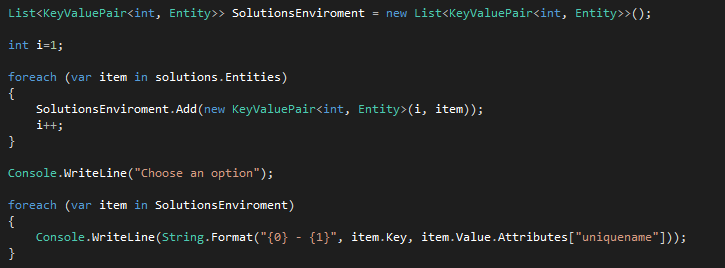
- The User will then select which solution he/she would like to install in the target environment.

- The Solution Export method will export the selected solution and save it in a temporary folder.

- Rather than going back to the path and retrieve the solution I decided to return it so I can now send the file directly to the other method

- The next step is to ask the User to enter the Target CRM Environment and the credentials:
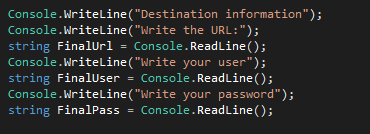
- Once we have the information, the final step is to connect to that environment and prepare the request for the import:

In this example I didn’t used any of the attributes of the ImportSolutionRequest, for more information please visit: http://msdn.microsoft.com/en-gb/library/microsoft.crm.sdk.messages.importsolutionrequest_members.aspx
- And SOLUTION INSTALLED 😉
This is just a really easy example to demonstrate how these web services can be used. There can be many upgrades to this application like:
- Possibility of selecting multiple solutions.
- Deploying to more than one environment at the same time.
- A nice UI 😉
- And more…
Hope you find this useful.
Cheers,
Mario


 MS Tech & Coffee
Leave a reply to Rhett Clinton MVP Cancel reply